Development · isolated test data
Skip to content

Bullion Brains Pivot Calculator

See the full pivot map.

Read the ladder. Respect the context.

Check support, resistance, and CPR for gold and other commodities across COMEX and MCX. Compare the full ladder before deciding which levels matter to your session.

Create an account or sign in to open the workspace. Your plan determines access to live data, alerts, and exports; you can compare plans before subscribing.

Workspace stateBullion Brains
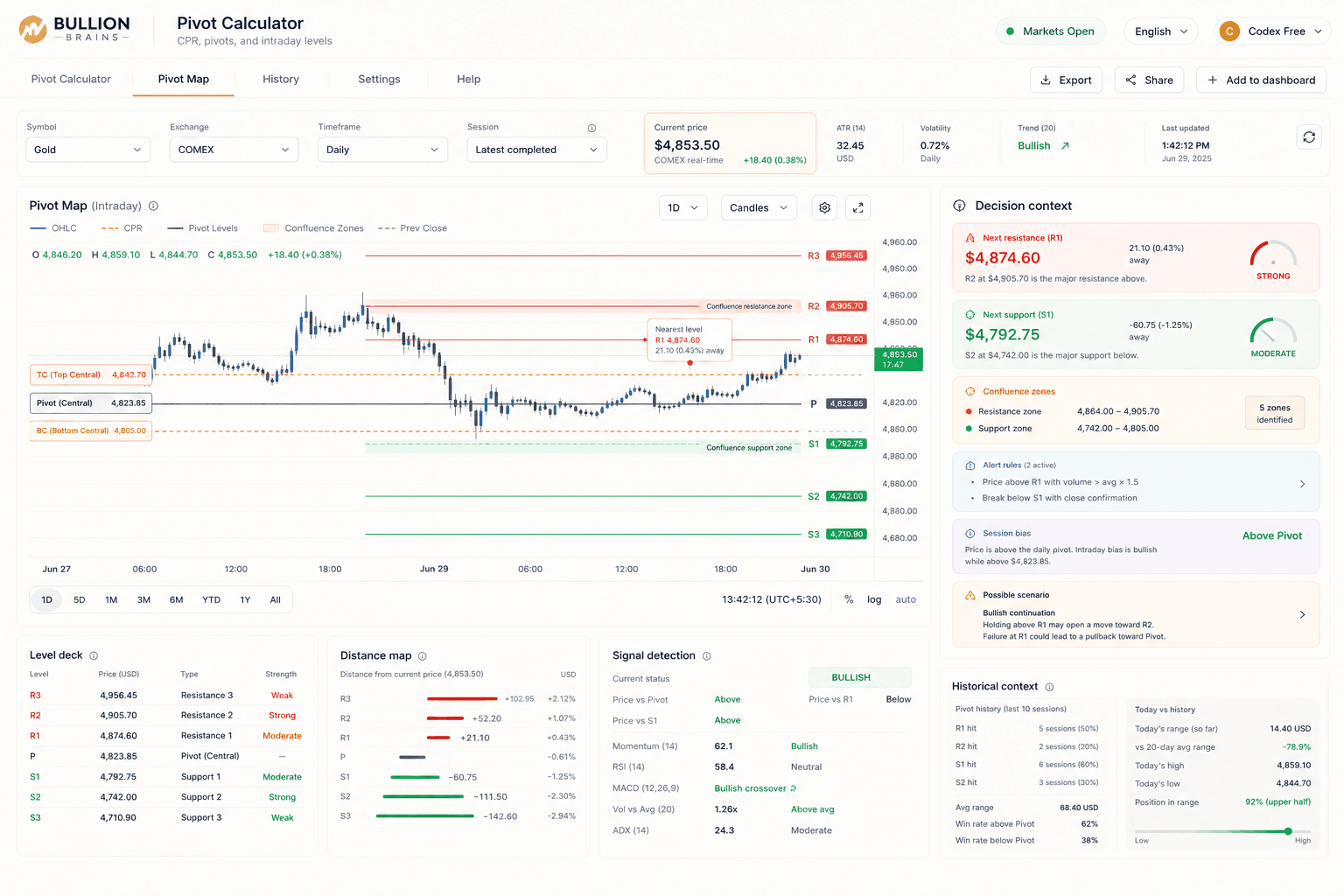
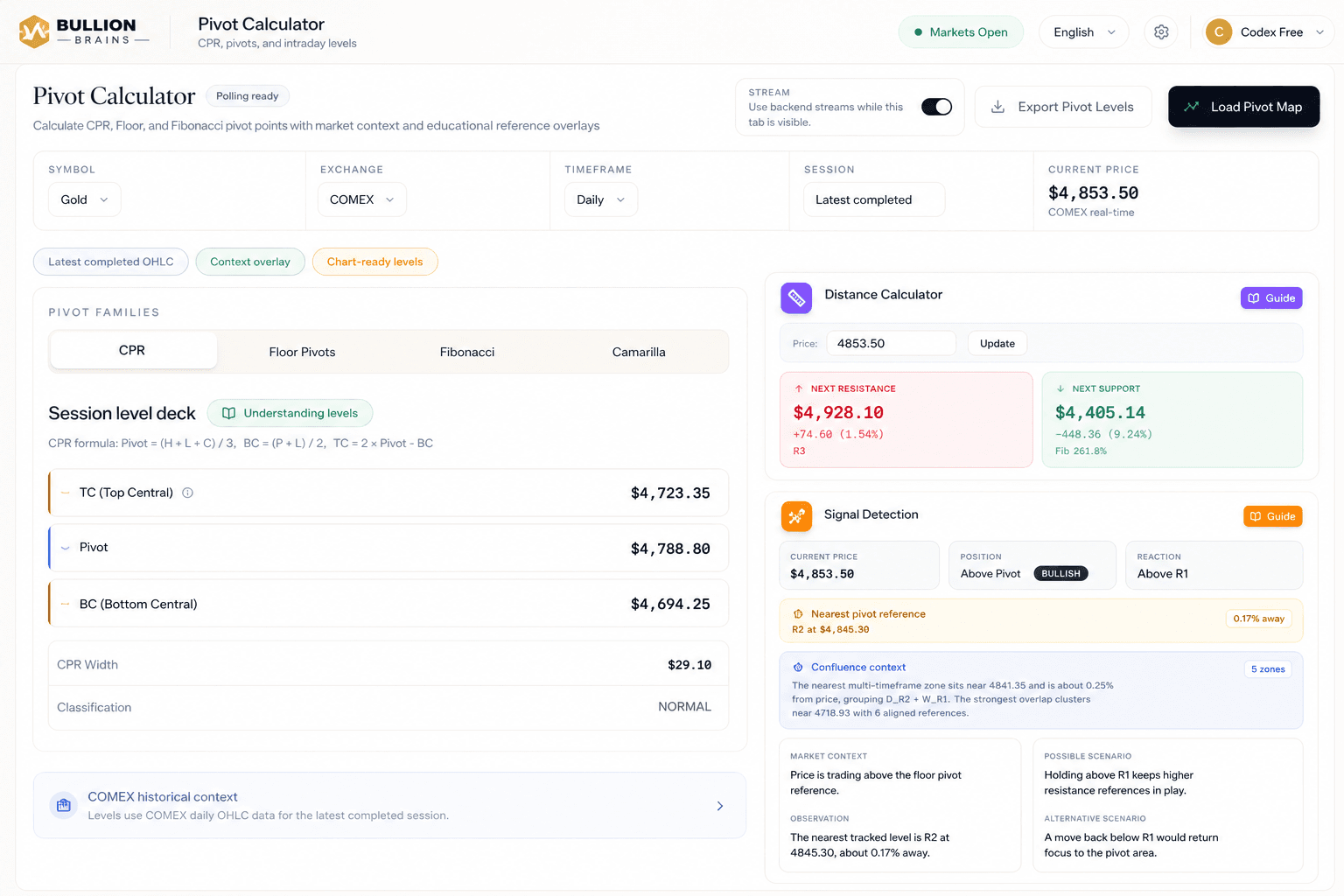
Bullion Brains pivot workspace showing market selectors, session deck, and chart-ready context

Real pivot workspace capture with selector context, session deck, and chart-ready market structure.

Decision supportDistance + alerts
Bullion Brains pivot workspace showing distance, alert, and decision-support context

Trader Workflow

Select. Read. Act.

The pivot page is built for fast desk preparation: load the completed session, understand the current level map, then move into reaction, distance, and alert logic without switching tools.

01

Select the commodity, exchange, and pivot horizon you actually trade

The workspace supports metals and energy contracts, COMEX or MCX reference markets, and daily, weekly, or monthly session structures.

Switch across GOLD, SILVER, CRUDE, COPPER, and NATURALGAS
Choose COMEX or MCX depending on the market you frame from
Load completed-session pivots before the open and keep context refreshing while the tab stays visible
02

Read the level map instead of forcing a narrative onto price

Bullion Brains puts CPR, floor pivots, Fibonacci, current price, nearest tracked level, and reaction labels into one decision surface.

See current price relative to the pivot ladder and CPR band
Use nearest-level distance to judge whether price is pressing into support or resistance
Check chart overlays before treating a move as a breakout or rejection
03

Move from observation into alert-ready trade preparation

The same workspace extends into signal detection, multi-timeframe pivots, historical accuracy, alerts, exports, and intraday recalculation.

Trigger alert logic when price approaches the levels you care about
Use multi-timeframe context before sizing around a single daily ladder
Export the map when you want chart overlays or TradingView-ready structure

Signal Depth

Good pivot work is not about one line. It is about the stack around it.

A session pivot only becomes useful when the trader can see how price is behaving around it. Bullion Brains adds CPR classification, floor pivots, Fibonacci levels, nearest-level distance, reaction labels, and alert surfaces so the market context is readable before execution.

CPR + floor pivots

Balance-zone structure and the classic ladder stay visible in the same workspace so you can frame the session cleanly.

Distance + reaction

Nearest-level distance and reaction labels help you judge whether price is merely hovering or actually pressing into a decision zone.

Alerts + exports

The pivot map can move into alert rules, Pine Script export, and chart overlays when the setup deserves active monitoring.

Connected Workflow

Pivot work is strongest when it sits inside the rest of the commodity desk.

Bullion Brains is designed as a connected research loop. Traders can frame the session with pivots, cross-check parity and macro timing, then move into platform access when the workflow becomes part of the daily routine.

Use fair value to judge whether local pricing is stretched before trusting a pivot reaction
Check the macro calendar when event timing can overwhelm an otherwise clean level map
Keep the same platform path for pivots, alerts, and chart export instead of stitching separate tools together
Desk loop links

Follow the adjacent research surfaces traders check before they trust a pivot reaction enough to act on it.

Bullion Brains workflow

Frame the session with pivots, pressure-test timing with macro and parity context, then keep the same platform for alerts and chart export when the setup deserves monitoring.

Search questions

Answers for MCX & COMEX pivot searches

The checks traders usually run before they open a pivot table for MCX gold, MCX silver, or a COMEX contract and start mapping the session.

Is the Bullion Brains Pivot Calculator available on the Free plan?

No. The live Pivot Calculator workspace, charts, maps and alerts require a paid Analyst plan or above. Free accounts and cardless Analyst trials do not have pivot workspace access. The public guide remains available; see the pricing page for current subscription prices and GST details.

How are MCX gold pivot levels calculated?

MCX gold pivot levels use the prior session's high, low, and close. The central pivot is (High + Low + Close) / 3, and the support and resistance levels are derived from it: R1 = (2 × Pivot) − Low, S1 = (2 × Pivot) − High, with R2/S2 and R3/S3 extending the range. The Bullion Brains commodity pivot calculator computes these automatically for MCX gold and rolls them forward each session.

What pivot levels does the Bullion Brains pivot calculator show?

It shows the full floor-pivot ladder (Pivot, R1–R3, S1–S3), the Central Pivot Range (CPR), and Fibonacci pivot structure, layered with price context and multi-timeframe levels. You can study daily, weekly, and intraday pivots for gold, silver, crude oil, copper, and natural gas across both MCX and COMEX in one view.

How do MCX pivots differ from COMEX pivots?

The math is identical, but the inputs differ because the sessions differ. MCX pivots are built from the MCX contract's own session high, low, and close in INR, while COMEX pivots use the COMEX session in USD. That is why an MCX gold pivot and the implied level from COMEX rarely line up exactly — the gap reflects USDINR, import duty, and parity, which is why traders read MCX pivots alongside the fair-value tracker.

How do I read CPR on MCX gold and silver?

The Central Pivot Range is the band between the pivot, the top central (TC), and the bottom central (BC). A narrow CPR signals a trending day and a wide CPR signals range-bound conditions, so traders use CPR width plus where price opens relative to the band to frame the session before acting on individual support and resistance levels.

Can I get pivot levels for MCX silver, crude oil, copper, and natural gas?

Yes. The calculator covers the liquid MCX and COMEX metals and energy contracts — gold, silver, crude oil, copper, and natural gas — with the same floor-pivot, CPR, and Fibonacci structure for each, so the workflow stays consistent whether you trade MCX silver intraday or position in COMEX gold.

Where can I check MCX crude oil pivot points today?

Open the Bullion Brains Pivot Calculator, select CRUDE and MCX, and load the completed-session inputs for the daily horizon. The resulting crude oil pivot point map includes the central pivot, CPR, R1–R3, S1–S3, and the current price context. Verify the contract and data timestamp before using today's levels.

What is the Central Pivot Range (CPR) TC BC pivot definition?

Central Pivot Range (CPR), TC, BC, top central, bottom central definition: the CPR is a three-line band built from the prior session's high, low, and close. The pivot is the center reference, TC is the top central boundary, and BC is the bottom central boundary. Traders read the band's width and the current price position as context, not as a guaranteed signal.

Are pivot points a buy or sell signal on their own?

No. Pivots are a context and structure layer, not a standalone entry signal. Bullion Brains treats pivot levels as where to watch reaction, then confirms with CPR, multi-timeframe alignment, fair value, the macro calendar, and risk controls before a level becomes actionable.

Session Preparation

Start the day with a market map, not guesswork.

Open the Bullion Brains pivot workspace, build the level deck, and decide with objective commodity structure already in front of you.